

Sign in to print or save this article
Printing and saving articles is available to signed-in users. Sign in at http://netaphor.com/support/signin, or request an account at http://netaphor.com/support/request-access.
AA-00557 · http://netaphor.com/kb/AA-00557/discovery-progress-diagnostics-view
Discovery Progress Diagnostics View
The Discovery Progress diagnostics view provides information about Netaphor SiteAudit™ past and current discovery of networks and devices.
The Network Discovery Progress section corresponds to entries on the Networks tab of the Discovery Configuration dialog box (Setup menu, Discovery). The Range Discovery Progress section corresponds to entries on the Devices tab.
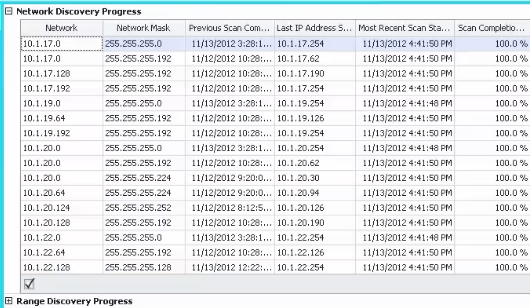
Columns:
| Network Discovery Progress | |
|---|---|
| Column | Description |
| Network | Network address of a network in which SiteAudit looks for devices. |
| Network Mask | Subnet mask used with Network to identify host addresses for discovery. |
| Previous Scan Completed | When the last scan finished. |
| Last IP Address Scanned | Last address scanned in the network. |
| Most Recent Scan Started | When the most recent scan started. |
| Scan Completion Percent | How much of the most recent scan is complete. |
| Estimated Time Remaining to Complete Scan | Approximately how much time remains before the current scan is finished in days, hours, minutes, and seconds. This is blank if the most recent scan is complete. |
| Duration of Previous Scan | How long the most recent scan took in days, hours, minutes, and seconds. |
| Duration of Current Scan | How long the current scan has taken in days, hours, minutes, and seconds. |
| Scanned | Whether the network was scanned. If a network is excluded from discovery, the value in this column is False. |
| Range Discovery Progress | |
| Column | Description |
| Start Range | Starting IP address of a range of addresses in which SiteAudit looks for devices. |
| End Range | Ending IP address of a range of addresses in which SiteAudit looks for devices. |
| Previous Scan Completed | When the last scan finished. |
| Last IP Address Scanned | Last address scanned in the range. |
| Most Recent Scan Started | When the most recent scan started. |
| Scan Completion Percent | How much of the most recent scan is complete. |
| Estimated Time Remaining to Complete Scan | How much time remains before the current scan is finished. This is blank if the most recent scan is complete. |
| Duration of Previous Scan | How long the most recent scan took in days, hours, minutes, and seconds. |
| Duration of Current Scan | How long the current scan has taken in days, hours, minutes, and seconds. |
| Scanned | Whether the range was scanned. If a range is excluded from discovery, the value in this column is False. |
| Number of Hosts | Count of host computers found within the range. |
Applications and Benefits
The Discovery Progress diagnostics view is useful for
- Seeing where SiteAudit is in the discovery progress
- Confirming that discovery has completed
- Determining if / when discovery has completed on a network, range or device
- Determining whether the discovery criteria should be optimized. For instance, if the view shows that discovery will take a long time to complete, this indicates that SiteAudit is performing discovery on very large or very slow networks. You should modify discovery so that only addresses or ranges having printers are discovered.