

Sign in to print or save this article
Printing and saving articles is available to signed-in users. Sign in at http://netaphor.com/support/signin, or request an account at http://netaphor.com/support/request-access.
AA-01368 · http://netaphor.com/kb/AA-01368/unsupported-browser-error-during-hosted-control-panel-login
Unsupported Browser Error During Hosted Control Panel Login
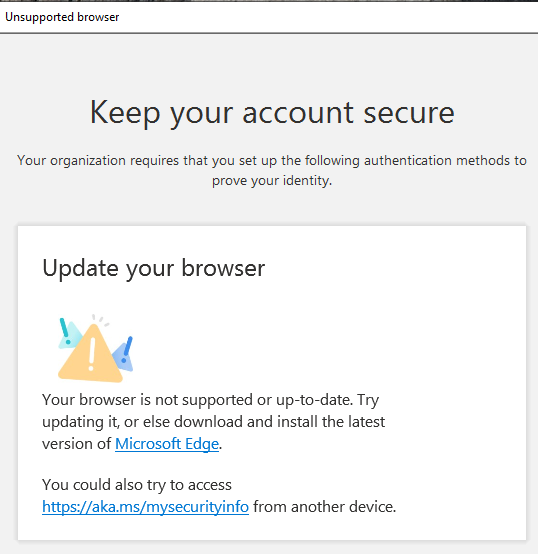
During the Hosted login process, the SiteAudit Control Panel will launch a popup window using your browser. In some cases, the user's default browser being launched is seen as an unsupported browser version.
Resolution
When seeing this issue, the following registry edit may resolve this error. This registry key updates the default mode for the SiteAudit Control Panel web browser control to a supported version.
[HKEY_LOCAL_MACHINE\SOFTWARE\Microsoft\Internet Explorer\Main\FeatureControl\FEATURE_BROWSER_EMULATION]
"SiteAuditControlPanel.exe"=dword:00002af8**
**
Manually Change the Registry Key
The following steps describe how to manually set the registry key.
- In Registry Editor, find the following subkey: HKEY_LOCAL_MACHINE\SOFTWARE\Microsoft\Internet Explorer\Main\FeatureControl\FEATURE_BROWSER_EMULATION
- Right-click on the subkey and select New > DWORD (32-bit) Value, then name it SiteAuditControlPanel.exe.
- Right-click the SiteAuditControlPanel.exe registry entry, then select Modify.
- Check that the Base is set to Hexadecimal, then enter the value 2af8. Select OK.
Update Registry Key Using Registry File
The following steps describe how to update the registry key using the file attached at the end of this article.
- Download and extract the content of the SiteAuditBrowserReg.zip file onto the machine where the SiteAudit Control Panel is launched.
- Double-click the SiteAuditBrowserReg.reg file to merge the changes into the registry. If prompted by User Account Control or Registry Editor, choose 'Yes' to continue.
**